by a Thinker, Sailor, Blogger, Irreverent Guy from Madras

Showing posts sorted by relevance for query google-maps. Sort by date Show all posts

Google Maps gets ‘Views’ to share photo spheres web-tech


In November 2012, Google revealed photo-sphere - a place completely different from Northern hemisphere and Southern hemisphere. 

Now they have done the next logical thing - added photo-sphere to Google Maps - so that we have 3 spheres when we browse Google Maps <just joking>.

To rewind, the Android Jelly Bean 4.2 update introduced an enhancement to the panorama photography feature.  It extended the panorama capability to full 360 degrees around (and stitched together on top and bottom) to create an all-around view, which they termed 360º photo sphere.

If you have visited Google Maps of late, in July 2013, you would have noticed a nag screen pop-up, urging us to try out the new Google Maps.  Go ahead and try it out.  It is awesome. 

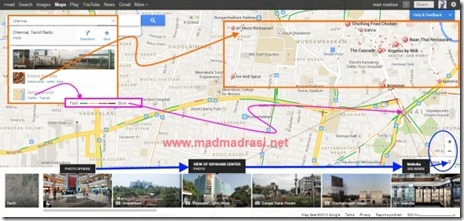
On top left we have options to get information on restaurants, cafes, bars, etc., and also traffic information.
Clicking on restaurants shows up the restaurants in the area of display.  I heard there was a nice Thai restaurant near Greams Road, but never knew the exact location, till today.  Baan Thai, get ready for a review!
;-P
google_views
The traffic information appears to be real time.  Really surprised that Google has ability to plot real time traffic information at Chennai.   It surely is believable for the traffic circle underneath Anna Flyover shows up as a red circle - and it is always jammed at this time of the day!

In the new Google Maps, the right bottom corner, near the zoom control, is the image gallery.  With the image gallery ‘on’, we can see all the types of images uploaded by users, in and around.  We have had photos for a long time now and a panorama view for quite a while, but there is already a photo sphere too!
Vijaya Mall is already there (and when you zoom in, there is also Hotel Green Park).  The symbols on the image of the gallery identify the type of picture.

So how do we upload the 360º photo sphere images to Google Maps?  That is where the Google Views comes in.

To add a photo sphere:
  • sign into the Google Views with Google+ profile;
  • click the blue camera button on the top right corner
  • import the photo spheres from Google+ photos; or,
  • upload photo spheres from the Gallery in Android by tapping “Share” and then selecting Google Maps.
Google Views will have a individual page which shows all the individual users photo spheres.

BTW, Views also incorporates Street View Gallery, so all those street views would also be available there.

Read More

Animated, Interactive Ponniyin Selvan on Google Earth Map


In March (2014), I had traced the places or locations where the classic historical fiction Ponniyin Selvan by ‘Kalki’ R. Krishnamurthy is supposed to have taken place on Google Maps.  As I wrote back then, it was an interesting, but time consuming effort.  While admirable – even if I say so myself, it was just a map – no interaction or animation – that is, it could not tell you the ‘story’.

Two weeks back I decided to sit down and do something about it.  While Google Maps, as of now, is capable of providing interactivity, it still does not have some crucial elements for animation.  By animation, I mean the ‘tour’ feature, which will allow us to tell a story.  If not, we end up with some dumb ‘place markers’, which do not do anything on their own.  Unless the viewer knows the story beforehand, she cannot click on the placemarks in the correct sequence.

In September 2013 or so, Google released a Google Earth ‘experiment’ called Tour Builder [https://tourbuilder.withgoogle.com/].  More than an year later, I tried it out for the Ponniyin Selvan animated, interactive tour.  Sadly, I found that it is nothing more than a ‘marriage’ of Powerpoint - sorry, Google Slides -  and Google Earth.  Once again to read the tory, it required the user to click on the slides or images.  The only difference was the inclusion of Google Slides linked to their Placemarks enabled the user to follow a story in the correct sequence.

Thus it was time to hack the Ponniyin Selvan Keyhole Markup Language (KML) file exported from Google Maps.  It was an interesting two weeks mucking around with that, and frequently referring to the KML Documentation to understand what is possible with KML.  Then a further couple of days was spent on writing & testing out an MS Excel Macro to make a KML file.  The intention of the macro is to ease the production of Parts 2 to 5 of Ponniyin Selvan KML.  A day more to fine tune it, and here it is.

An animated, interactive story of Ponniyin Selvan on Google Earth Map.  Sit back and enjoy.
Notes: 
  • You need Google Earth Plugin (download for free from [https://www.google.com/earth/explore/products/plugin.html]
  • Google has dropped NPAPI (Netscape Plugin Application Programming Interface) for 64 bit browsers, & if you use a 64 bit browser – like Chrome 64 bit or IE 64 bit – the GE plugin will *not* work.  In fact, Google will drop NPAPI support in 2015, by which time, Google Maps hopefully will support tour feature. [http://blog.chromium.org/2014/11/the-final-countdown-for-npapi.html]
  • If you have the full Google Earth application (free or pro) installed in your system, you can download this file and enjoy it on your desktop. 
  • Tip:  After download –> double-click to open in GE –> in GE –> Sidebar –> Places –> Temporary Places –> Ponniyin Selvan –> click on Part One.
  • If you cannot see all the icons of Placemarks first time around, try it out the second time or pause the video for a couple of seconds.

Meantime, you can enjoy it on YouTube too.


Please do comment, and you can always reach me direct with the Blogger Contact Form on the sidebar.  Cheers!

Image for Pinning:

ponniyin-selvan-part-one-on-google-earth


Read More

Google April Fools’ Day 2013 Jokes


Google has made it a habit to unleash a slew of gags and pranks with imaginary product launch on April Fools' Day.  Google’s practical joke begins in 2013 with an offer of a Treasure Hunt in an old Map when you launch Google Maps.

Last year Google pulled a similar trick with a gag of 8-bit Google Nintendo Entertainment System (NES) maps, which was hilarious.  If that 80’s NES look was not retro enough, Google went further back to the 1800’s with this years launch of April Fools’ Day pranks with a supposed Treasure Hunt on Google Maps.
:-D

Be warned though.  Google warns that the April Fools’ Day Treasure Hunt Map is based on “Beta Maps technology and has certain requirements.  Your system may not be able to display at higher resolutions than paper print. Take care when unfolding the map to avoid ripping it.”

Here is want happens when we try our hand at the Google April Fools’ Day Treasure Hunt by clicking on the ‘Try it now’ button.

google_maps_april_fools_day_2013

People are going to have a nice time trying to spot what Google has put in in that April Fools’ Day Treasure Hunt map.

Update:  read about Google Nose, +Emotion and YouTube
Update:  read about  Google Fiber Poles and Gmail Blue

Japan has Mt. Fujiyama, while India is represented at Delhi with a crown, engraved with the Lat-Long coordinates - along with that shame, Commonwealth Games Village.

japan

new_delhi

Paris has the Eiffel Tower while London has the Eye.

london

paris

In the United States, all I could spot apart from Washington Monument was the Palo Alto Observatory and of course the Google Head Quarters!!

palo_alto_google_hq

washington_dc

Read More

Solar Impulse 2 Full Flight Path Google Maps


Solar Impulse 2, the first fully solar-powered aeroplane, has completed the first round-the-world flight, after touching down in Abu Dhabi early on Tuesday, 26 Jul 2016.

The plane, with a wingspan wider than a Boeing 747 and carries more than 17,000 solar cells on its wings, began the circumnavigation on 09 Mar 2015 in Abu Dhabi. It has since crossed both the Pacific and Atlantic Oceans using no fossil fuel and has spent 21 days in the air, chalking up a total of 43,109 km.

The aim of the Solar Impulse 2 adventure was not to demonstrate solar-powered planes for widespread use, but was more humble – to publicize the capabilities of renewable energy.

Piloted in turn by Bertrand Piccard and Andre Borschberg, the Solar Impulse 2 is not much heavier than a car, but has the wingspan of a Boeing 747, and has a cockpit just about the size of a public telephone booth (do you even remember one?), with the pilots forced to wear oxygen tanks to breathe at high altitude and can sleep only for 20 minutes at a time.

But even with all these difficulties, some 19 Aviation World Records were broken/set - flight from Nagoya in Japan to Hawaii, US, lasted nearly 118 hours, with Borschberg breaking the record for longest (time duration) uninterrupted solo flight.

The tactic was to climb to higher altitude, as required or modelled for the leg, during day time when the solar cells are getting charged, and glide down slowly during the nights when the cells are not being charged.  As can be seen in the Google Maps, the maximum altitudes of around 8400 - 8600 metres were attained during the long legs of 2 days or more.

The obvious question is why not climb even more higher, and why stop at around 8500 m (~27,800 ft)? Why not climb to 35,000 ft (~10650 m) like airplanes do, and glide even further?

The answer is the cabin is not pressurized, the temperature drop would be excessive (-65F / -53C), and the pilot had to resort to oxygen bottles to breath above 8000 m - the much ill famed 'death zone' in mountain climbing.  A point to remember is skydivers making jumps from 15,000 ft (~4500 m) are required to carry oxygen on the way up, and above 23,000 ft (~7000 m) are required to carry oxygen both up and diving down.  That's the reason Solar Impulse 2 kept to around 8600 m maximum altitude.

What about future? Personally I think it would be wonderful if Solar Impulse 3 attempts a similar circumnavigation in 8 legs, instead of 17, in 8 weeks.  Take off from Abu Dhabi - Kolkata - Nanjing or Shanghai - Hawaii - California - Pennsylvania or New York or Boston - Seville - Cairo - Abu Dhabi.

So here is the full Flight Path (simplified) of Solar Impulse 2 in Google Maps, giving the details of airports landed, legs travelled, with distance, time, and maximum altitude attained during that leg.


Picture for pinning

solar-impulse-2-flight-path-full-google-maps
Read More

Tracing Ponniyin Selvan on Google Maps


Once again mesmerised by the 1950s written Historical Fiction “Ponniyin Selvan” (பொன்னியின் செல்வன்) by Kalki R. Krishnamurthy, I had the crazy idea of plotting the places mentioned in the novel on Google Maps.  An internet search threw up a couple of earlier attempts from 3 to 5 years ago, which gave me hope.

Not because I consider myself to be better, but because Google Maps has grown into a much better, detailed product-service over the last few years.  In 2014, small towns, villages and even footpaths are mapped much more in detail than they were years ago.

But such detailed mapping itself raised quite a few problems, while attempting to locate the places in Ponniyin Selvan. 

The first problem is after ~1050 years, almost none of the historical places are identifiable.  There are no traces of the 2 capital cities of Chola dynasty - at Pazhayarai and Thanjavur.  The Thanjavur capital was razed by the Pandyan King Maravarman Sundara Pandyan, circa 1216, in revenge for the torching of the Pandyan Coronation Hall at Madurai in 1205 by the Cholas.  When the 2 capital cities themselves have disappeared, what can we say about smaller palaces and buildings.

A thousand years is a long time for man made constructions to survive, more so, when the land on which they stand have changed allegiance to 10 or more kings and rulers.  Even the rivers must have changed their courses in the 1000 intervening years.

The next problem with such detailed mapping and satellite imagery is marking a palace or a building at a place, owned in reality, today, by a person.  Even without consulting my lawyer, I can imagine the chaos and legal blowback that would result.   To circumvent this potential trouble, I have opted to mark the non-existent buildings or places at locations which are of public in nature.  Thus Kundantai Astrologers house is marked as on top of a pond, next to a Kali Temple on the outskirts of Kumbakonam.  Likewise, I chose to mark the Pazhayarai Palace in proximity to the Raja Raja Chola Mausoleum in Pazhayarai.

Similarly, marking the track the characters are supposed to have travelled a 1000 years ago is a problem because the jungles and forests of those days are farmland, plantations and hamlets today.  OTOH, it is absurd to draw a straight line from one point to another.  To obviate this, I have chosen to mark the track on the present day roads.  If nothing else, it makes the map appear far better and pleasing to the eye.

The one fortunate aspect of such detailed mapping and inputs by Google users is that almost all the temples are identified.  Fortunately, all the aggressors in Tamil Nadu history have kept their hands off the Temples and religious structures, and so all those 1000 year old temples are still there.  For the rest, it is all approximations - for e.g., the place where Vandhiya Devan and Azhvarku-adiyan cross R. Kollidam.

In the story, the servant of Kandan-Maran who is sent along to procure a horse on the other bank, does so from Thiruppanthal.  Hence the Ferry Point is marked closest to that town.  BTW, this type of assumption was not possible a few years ago, because Google Maps itself was not detailed enough to locate that small town.

Looks like it will take me all of March 2014 to complete the task - in 3 days, all I have managed is to mark up to 9th chapter.  Do suggest any corrections or mistakes.

Oh! I forgot earlier to add the Google Map link: http://goo.gl/M1Jo2a

ponniyin-selvan-in-google-map

PS:  BTW the English translation of the Novel (5 volumes) are available for free at projectmadurai.org and at 3 more websites - refer: en.wikipedia.org/wiki/Ponniyin_Selvan.  You can also buy the book(s ) from Amazon at a hefty price of $29 per volume (?)


Read More

Google April Fools’ Day 2013 more Jokes


Google’s practical joke began in 2013 with an offer of a Treasure Hunt in an old Map overlay when you launch Google Maps. 

Google Maps Treasure Hunt
A special treasure map mode on Google Maps allows us to explore the hand-drawn-like map with landmarks, hidden treasure chests, and a warning to be “Beware of pirates!”  One of the first posts on this Google April Fools’ Day joke was here.

YouTube shutdown
Just before or at the same time, Google also tried a gag in YouTube saying the site is an 8-year old experiment to choose the best video ever made and YouTube will be shutdown on April Fools’ Day.  It fell flat.  Even the announcement sounded a bit lame.

Google Nose
Then came the quite humorous launch of Google Nose - the new scentsation in search.  The announcement says:
  • Google Nose leverages new and existing technologies to offer the sharpest olfactory experience available:
  • Street Sense vehicles have inhaled and indexed millions of atmospheric miles.
  • Android Ambient Odor Detection collects smells via the world's most sensible mobile operating system.
  • SMELLCD™ 1.8+ high-resolution compatible for precise and controlled odors.
:-D

+Emotion in Google+
The latest as of now is the +Emotion icons in Google+.  In the words of +Erik Murphy “To give it a try, simply open one of your pictures in the lightbox, and click the ‘Add emotion’ button at the top left of the screen.   We will plumb the emotional depths of everyone in the photo, then summarize their feelings with a beautifully crafted, emotion icon.”

To test whether it really works, I mashed up publicly available photos of the President of India (Pranab Mukherjee), 4 former Prime Ministers (Indira Gandhi, Rajiv Gandhi, P.V. Narasimha Rao, A.B. Vajpayee) and 3 Prime Minister hopefuls (Narendra Modi, Rahul Gandhi and J. Jayalalithaa).

And it sure works.  Look at the fuming Narendra Modi.  (Please also note that I included the Sari clad Tamil and not a Dhoti clad Tamil as PM hopeful)
;-D

first_among_equals

Update: read about Google Fiber Poles and Gmail Blue

And my own avatar::


Read More

$400 Google Earth Pro is Free, What is New?


About a month or so ago, Google Earth Pro was converted as a Free Service by Google.  Google Earth Pro for free should be a godsend to architects and real estate agents, especially in the US.  So what does it do for ordinary users, hobbyists and the like? [Download guide in the last paragraph]

One thing that it does for normal people is we get to enjoy a product or service which even in 2014 used to cost $ 399 per year.  Now all those corporates and gungho types who used to flaunt their GE Pro subscription can look sheepish, grin and curse Google.  Apart from that satisfaction, is there anything really useful for normal users in Google Earth Pro, which could not be done in the original Google Earth?

For the record, here are things you can do with Google Earth Pro:
Not so much for normal user-
  • Print high resolution images (a normal user is not going to print at such high resolution)
  • Import 2500 addresses at once (does any normal person have 2500 addresses?)
  • Capture HD Video of screen (yeah, we do HD videos every day)
So is there anything at all for a normal user or hobbyist?  Yes, there are-
  • 3D Measurements (good if you are planning some construction, or additions)
  • Demographics & Traffic Counts – only US (as I said great for users in USA)
  • Parcel Boundaries – only US (zoom to a property and view assessed value, zoning, construction date, area, lot size, etc.)
  • Drag & Drop GIS data – (while not a full fledged GIS tool, GE Pro should be good enough for most)
Here is the shapefile (SHP) of the districts in my home state Tamil Nadu in Google Earth Pro.  Earlier I had to fiddle around with QGIS, to even view it.

shapefile-in-google-earth-pro-for-free

Though SHP files can be viewed in Google Earth Pro, you cannot edit them.  For that you still need the free QGIS or other GIS tools – not that editing a shapefile is easy even in QGIS.

If you are willing go get your hands dirty, an alternate is to save the SHP file as KML, then edit it in either a Text editor like Notepad++ or in Google Maps, or in combination.
:-P

Download Google Earth Pro from [https://www.google.com/earth/download/gep/agree.html]

Till last week you had to fill up a form to get a licence.  It has been superseded with the universal licence key ‘GEPFREE’.  Use your Gmail ID with ‘GEPFREE’ (without quotes) to sign in.

In case your download fails (it did for me twice), use this direct link instead [http://dl.google.com/dl/earth/client/advanced/current/googleearthprowin.exe]

Update June 2015:  Use direct links for Google Earth Free/Pro from this page instead
[https://support.google.com/earth/answer/168344?hl=en]

Enjoy!

Read More

Watch Fantastic Beasts for Free - not the movie though


By all accounts, the Fantastic Beasts and Where to Find Them is a terrific success.  In the language of the millennial, it is a megahit.  In the language of the people of certain age, a super-duper hit. And unfortunately because of the idiotic note ban by the Narendra Modi Sarkar, I’ve found enough spare cash to watch the movie, yet.

But then, I woke up one fine morning, and found that there are enough quaint beasts running around, which are even more fantastic than the made up world of J.K. Rowling and Harry Potter.  In fact, they are even more crazier than Harry Potter can imagine.  They vary in colour from orange to dark to yellow, the spew absolute nonsense, their actions are mostly bizarre and wear outlandish outfits.  If you bother to take a a real, open minded, humourous look at them, you will realise that these are indeed, Fantastic Beasts, and you always know where to find them, and watch them for free – courtesy internet and cable.

So, here are the Fantastic Beasts and Where to Find Them on Google Maps, and also on Google Tour Builder.  The image is just for representation and pinning.  Soon the Fantastic Beasts will be telecast live on YouTube.

BTW, I started around Rift Valley, Africa, where the fantastic beast Homo Sapiens is theorized to have emerged, walked over the Red Sea, from where one branch drifted out east, to India, China, to the South and finally that topsyturvy continent Australia.  Meanwhile another group is theorized to have branched off northwards, displaced the Neanderthals in Europe, then emigrated to the New World.

If you do have some suggestions for a few more fantastic beasts, do post in comments – there are about 6 slots open.

Note: Names, Characterization, Localization, & Images are entirely fictional & of author's imagination. Any resemblance to reality is entirely coincidental.
fantastic-beasts-google-maps-2016

If you would like to enjoy it in Google Maps, here is the link
If you would like to tour it on Google Tour Builder, the link
A YouTube video will soon be available.

Read More

Customized Tharpana Sankalpam Generator Online or Desktop


Ask people what Computers – specifically the desktops, laptops, or handhelds like tablets or mobiles – are for, and they probably would respond about internet, specifically about Facebook, Twitter, or Instagram.  A very few might think of MS Office or Google Docs.  Barely a handful might say that a computer is a tool which is meant to free us from repetitive tasks, to be done more efficiently (thousands of times faster), more accurately (less number of errors), more speedily (multi-tasking), and more cheaply (electronic delivery). 

The computing of things continue to evolve over time, sometimes within months.  The Moore’s Law on doubling of processing power every 2 years must have a contemporary on the software side.  My Google Map attempts of Ponniyin Selvan, clearly prove how Google Maps have improved over the years. 

Likewise, in the 2 years or so after the first attempt at Personalized Tharpana Sankalpam Generator, the Google Docs, Google Sheets and Google Scripts and even Google Fonts have improved to an impressive extent. 

To recap, these are the main issues which made be abandon the online, Google Drive-Cloud Based Tharpana Sankalpam Generator and instead opt for the MS Excel based desktop tool:
  • in-cell dropdowns which facilitate pre-filled selections/options were missing;
  • standardized fonts, so the transliteration reflects the expectation, and is not garbled could not be effected;
  • stability of fonts, so that the vowel-consonant marks are preserved as should be, and does not become rubbish was not implemented;
  • the user were familiar with Excel.
OTOH, there were also some drawbacks in using MS Excel:
  • non-use of macros, as it might downgrade overall security;
  • the irritation checking for, and downloading updates;
  • protecting with password, to maintain formatting integrity;
  • protecting with password, to prevent copycats;
  • use of Microsoft’s Excel and Fonts in what is essentially a Freeware (though not Open Source) tool;
  • user dependency to format, and print the output.
If we add the advantage of the present day Google Drive with its Google Forms, Google Sheets, and Google Scripts:
  • the Google Drive Cloud server does all the dumb work;
  • modifying or updating the code is easy;
  • the formatting is taken care of by Google Script – no need to worry at every update or modification;
  • the delivery of output is seamless;
  • easy workflow for the user too – just download and use;
  • multi-language output is possible, and so on.
While working on ways to deliver Yajur Upakarma procedure, it became apparent with the improvements in Google Scripts and Docs, the Amavasya Tharpana Sankalpam Generator (and other such tools) can easily go online.  Which brought up some unique problems, and a week or so to solve.


Read More

Use Google Spreadsheet as a database - 1


Whatever the disadvantages of Google docs and however much you like MS Excel, Google docs - especially Google Spreadsheets - beats everything when it is time to store, manage and display information online.

A friend asked me in 2009 to put up a simple web presence for his small business.  It is a sub dealership for a National Bike and Scooter company and the criteria for the online presence were:
  • shouldn’t cost much money - preferably a free host, a minimal design even using standard templates and no hidden or recurring costs by way of bandwidth etc.
  • should be easy to update information in it - like changes in price or taxes etc.
  • should be easy to operate - need not contain fancy eye-candy like flash or video which would be difficult and time consuming to alter.
  • should be user friendly - provide enough information for user to make him/her trust the business and be easy to use the site.
  • should not involve much online time (even for updates) by the operator (an employee), to avoid Orkut/Facebook, Online Gaming time and possible malware infection.
The reasons are obvious and don’t merit any explanation.  The choice under such conditions was also obvious - Google sites.  It is free, offering huge amount of storage and no worry about bandwidth or website up time. 

It is not an ideal or even a great solution as there will be no PHP, SQL, Flash or ASP, (which suits us fine) but for a small business, it does the job.  Since the business itself targets local consumers, such a site coupled with Google Maps is, in my opinion, the best free solution possible.

As using SQL or any other database is out, the obvious solution was to fall back on another Google products, the Google Docs - especially the Google Spreadsheet.  By uploading various data for all the bikes and scooter in a Google spreadsheet and then embedding the necessary parts inside the Google site with a Gadget, the problem was easily solved (or not so easily - read on).

google_docs_login

Such a spreadsheet also caters to 4th requirement as the business can keep a copy of the spreadsheet locally on the PC as an MS Excel (or even OpenOffice/LibreOffice) spreadsheet or Google Docs Offline, make changes locally when needed and replace the Google Docs in a couple of minutes.

In part 2 - the Challenges faced in display the relevant data using Google Spreadsheet as a database and updating the data.
Read More

Is History just making it up? - part 2


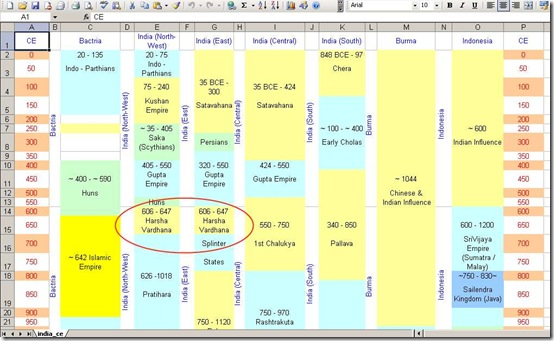
Here are the various kingdoms of India from 1 CE (AD) uploaded as Google spreadsheet.  The original MS Excel file as mentioned in “Is History just making it up? -1” is corrupt in the sense that Google Documents doesn’t like it and throws up an error.

Apart the ‘full’ work book is really a ‘spreadsheet’ in its truest sense.  It starts with South America in column ‘C’.  The previous version (evolution ver.1m) I had emailed to many ‘ORKUT’ friends in 2007 ended with Japan in column ‘BQ’. 

Subsequently added Africa in columns ‘BR’ to ‘BX’ (which still covers only Maghreb Africa from Sudan to Tunisia, without Libya).  The other countries of North Africa and the vast Sub-Saharan Africa are yet to be filled in.  Thus, this version is numbered as evolution ver.1n.

But the spreadsheet displayed below is not even the full ‘evolution’ sheet.  This is just the columns relating to India and its immediate neighbours.  Even this doesn’t give us the full picture, as there is not way to depict the 556 princely states which existed within the borders of the Independent India in 1947.

Note:
There is a big confusion about the number of Princely states in 1947.  The count varies from 556 to 565, 568, 572 and even 575.  I will stick on to what I read in NCERT text books (and which is burned by rote in my memory) - 556. 

This lacuna can be explained thus: 

The 556 number, as counted by the Iron Man of India, Sardar Patel, must have been the states which were ‘within’ the borders of the Indian Union or the Republic as we know now [http://princelystatesofindia.com/Maps/maps.html].

The 565 or 568 count may well be as per the borders of the ‘Indian Empire’ which would include those princely states which were unfortunate enough to fall within the Dominion of Pakistan (from which Bangladesh broke away in 1971).

Apart there were also protectorates, mandates and dependencies of the British Indian Empire which extended from Somaliland through Aden, Malaya, Singapore, to Dutch East Indies and which did not fall within the borders of either the Union of India or the Dominion of Pakistan - including them might well take the count up to 572 or 575.

end of note

Thus, even these MS Excel/Google spreadsheets may not actually give a clear idea of the situation on the ground (pun intended).  Probably the only way is to depict the kingdoms on an interactive map (thematic map or a choropleth map)

Again, to give a clear idea of what exactly was the situation on the ground, we need to map the kingdoms as they existed at a single point in time. 

For e.g., in ~300 CE (AD),
  • North-West India (which would comprise present day Pakistan and parts of Afghanistan), was under Saka (Scythians) rule
  • Western India was under Persian Rule
  • Central India was with the Satavahanas, while
  • the Southern India was under the early Chola rule
So unless we can put up a thematic map with all these kingdoms, we would always be under a cloud. 

Another eg., let us take the Wikipedia image for the Maurya Empire [http://en.wikipedia.org/wiki/File:Maurya_Dynasty_in_265_BCE.jpg]. 
  • At that time (and even before - from the time of Magadha Empire) present day Tamil Nadu, Kerala and South Andhra Pradesh were under the rule of either -
    • the early Chola Kingdom or
    • the Chera Kingdom or
    • the Pandyan Empire
  • which you will never understand from either of the 4 image maps.
But back in 2003/04 there were no tools available to attempt it.  Even today, displaying such data, say in Google Maps is not an easy job.  The problem is not in displaying such an overlay, which would be simple.

The problem is in creating such an overlay.

Correct me if I’m wrong, but here’s the basic idea on how it should be done:
  1. Get an SVG image of India with ‘district’ boundaries
  2. Get hold of authentic maps of the various empires
  3. Colour the areas, district by district - then we will have the closest thing to an authentic map
  4. Advantage of this approach is that a kingdom’s expansion or shrinkage can be shown district by district, every 50 years or so (as I’ve attempted in the spreadsheet)
  5. The downside is a manageable, affordable SVG editor, which can do the job without a lot of frills and bangs.
:-P

So why do I want to do it?

Because, apart from everything else, I want it to be a history lesson for those idiots -
  • who agitate for breaking up the states, the throwbacks to earlier days
  • who are in power, shoot their mouth off and create a festering wound
  • who are hungry for power, merrily fish in troubled waters without a thought about the nation
- who want the present states to be carved up further with Telengana, Vidharba, Maratwada, Harit Pradesh, Bundelkhand, Gorkhaland, even Southern Tamil Nadu (Nanjil Nadu?) and what not.

For e.g., Bundelkhand is nothing but the ancient Chedi Kingdom; and Nanjil Nadu (southern TN), if it does firm up, would be the ancient Pandyan Kingdom.

So what are we trying to do?  Undo the efforts of the Bismarck of India?  Bloody Air Heads all.
:-P

Related posts:
Is History just making it up? - part 1
Age of Empires - part 3


Read More

Google sinks the Great Barrier Reef


Today (or I noticed it today), Google on its home/search page provided a link to view the Great Barrier Reef through its Street View technology.

The invitation to explore was irresistible.  The link to the street view wasn’t.  It was (and still is as of this writing), broken.

It led us straight to the broken down Google Robot.  Certainly not one sitting in the Great Barrier Reef or any other ocean.

google_homepage_broken_link
The problem was in the link, which specified :
http://maps.google.com/streetview/gallery.html#!/ocean

Mangling the URL like http://maps.google.com/streetview/ leads you straight to the turtle off Heron Island, Great Barrier Reef, Australia.  With or without scuba gear, have a nice dip.
:-D

update: 2 hours later Google had corrected the URL which works just fine.
http://maps.google.com/help/maps/streetview/gallery.html#!/ocean

google_streetview_great_barrier_reef


Read More

New Google Menu Bar looks great, feels cumbersome


Somehow I have become immune to that ugly Black strip Menu Bar on top of the various Google services.  It is ugly, it is dark, it is irritating - but, it is definitely useful. 

Most of the Google services which I use regularly are just one click away, without having to remember and type in the URLs.  (Couple of others which I use frequently - like Google Transliterate and Google Translate, are on my Bookmarks bar).

google_black_menu_old

So it was a nice surprise today morning to find a brilliantly revamped, redesigned, fresh Menu Bar - actually a grid - on the Google Homepage.  It appears that Google is quietly rolling out the new Google Bar/Grid, which  looks awesome, fresh, pleasing and light.

google_bar_new_grid

First time I met the new Google Bar/Grid, I was greeted with the welcome message.  The Black Bar’s function has been taken over by the ‘grid’ near the SignIn button.  Clicking on it drops down the nicely populated Menu Box or Grid, which I can scroll to get to the services I want.

As I said, it is cumbersome.  With the Black Bar, most frequent services were just one click away.  Now it is at least two clicks and some scrolling too, to get to a favourite service - for e.g., Blogger. Duh!

Well, since I have decided to gripe about the changes, here are 2 more sour grapes after the first look.
  • It would have been better if the ‘grid’ was hover instead of a click;
  • It would be nice if the Apps in the starting grid could be customized - who wants Google Maps on the starting grid!
The new Google Bar I hear would be rolled out for all users in the next few weeks.  At present a lucky few have been blessed by Google with the New Bar.

The other news is that the Black Bar will be replaced by the new Google Bar across all services.  As of now, I can confirm the new bar in Search, Drive, GMail, and G+, but no sign of it in YouTube or Blogger.

google_bar_new_across_services
Read More

Google April Fools’ Day Jokes continue


The Google’s April Fools’ gags continues to roll out.  After the Treasure Hunt on Google Maps, YouTube Shutdown, +Emotion in Google+ and Google Nose (you can read them here), here are the Gmail Blue and Google Fiber Poles.

Google Fiber to the Poles
This one is a great gag, not just for the overall marketing but for the idea.  People would want this type of connectivity and readily jump at it.  Google’s engineers have supposedly rolled out their Google Fiber Gigabit connection to the electricity poles for easy connectivity.  The Fiber to the Poles homepage (fiber.google.com/about/poles/) even offers to ‘Find a Pole near you’.

google_fiber_poles

Go on!  Try it out!!
:-D

Gmail Blue
The Gmail Blue was unveiled about 1/2-hour ago.  To celebrate 9th birth anniversary of Gmail (?), Google pushes out the next big step for Gmail.  In Gmail Blue, everything is blue - from letters, buttons to even photos.  As they claim, it surely is awesome.  Google Blue is at gmail.com/blue.

gmail_blue
Read More

Google can add user data to Ads, changes terms of service


Once again, Google comes up with a subtle change in their Terms of Service, which will be operational from 11 Nov 2013.  While the tweaks are minor, the effects will be felt by everyone using Google+.

The most important change is to add users' names, photos, reviews or comments in Google’s own ads - called Shared Endorsements by Google.  It means exactly what it does - Any endorsements an user makes for a product or service can be shared.  Such endorsements would appear everywhere in the Google world - Google Maps, Google Play and Google Search results.

Of course users can opt out of sharing the endorsements or restrict appearance of endorsements to certain circles.  Sounds familiar?  It is similar to the Facebook move to display users’ face and names in ads about products which they liked.

Other 2 importance changes to Google ToS is the advisory or caution to use mobile devices safely and safety of password.  While both read like what a blogger like me would post in public interest, from Google it looks more like a gentle roll to avoid liability in case of stolen passwords, lost mobiles and improper use of both. 

I especially like the one about using mobiles while driving : It’s just good common sense: Don’t use our services if you’re doing something that requires your full attention, like driving, and our services might distract you. And, of course, always follow the law while driving.

What it means in practice is more and more of users’ activity is being digitally archived.  Over a period of months (or years), an active +1 clickers movement can be visualized - like plotting the shrinkage of glaciers!
8-(

You can read more about the new ToS at www.google.com/intl/en/policies/terms/changes/

google_changes_terms-of-service
Read More

Use Google Spreadsheet as a database - 2


Trying to display relevant data in a website using Google Spreadsheet along and allowing for an easy way to update the spreadsheet poses quite a few interesting, but not insurmountable challenges.

The background of why resort to such a method is in part 1.

For one, the information should not be hard coded into the site content as the specifications may change as for sure will the Price. 

A Google Iframe Gadget (I used one by Scott Johnston) can display only adjacent columns (or rows) and not random columns - for eg., it can display columns A,B,C,D,E but not A,C,E.  The solution was to create individual worksheets for each bike (scooter) and tell the gadget to display a1:b20 of relevant sheet by changing the reference ‘gid’ number in the URL.  Here is the (old) table named ‘hhtable’ (Google Docs).

Two, we wanted to provide the user the ability to compare the models - like based on Engine Capacity, Brake types, Wheel types or even Price and such.  Without access to SQL or any other database it was a vexing hurdle to cross, till I learned about Google Query Language (GQL) and how to use it in this excellent post by Tony Hirst at his blog [http://blog.ouseful.info/2009/05/18/using-google-spreadsheets-as-a-databace-with-the-google-visualisation-api-query-language/]

and the tool he has so thoughtfully provided [http://ouseful.open.ac.uk/datastore/gspreadsheetdb2.php].

Which involved a sub problem of its own.  It required the data to be transposed.  Earlier the ‘header’ was in Column-A and the data in Columns-B,C,D and so on.  Now for GQL to work, the ‘headers’ have to be in Row-1 with the data in Rows-2,3,4 and so on.  No problems as just transposing the data (or using an array formula) into a new spreadsheet ‘hhtable1’ (Google Docs) proved good enough. 

hhtables_compare

A suitable link in the home page (Google sites) offering options under ‘Compare Models’ was a hit generating considerable enquirers and the site itself appears 2nd on the Google Maps listing, right after the manufacturing company’s own Chennai office.
:-D

But this August the principals parted ways with their foreign collaborator which meant a site update.  Attempting to rework the site highlighted my own shortcoming as a web designer without a lot of foresight.
:-P

The problems were:
  • Change the logo - not much trouble as every Facebook user knows how easy it is to remove the old avatar and upload a new one
  • Modifying the manufacturer’s name in the website content - is also easy, as ‘Find > Replace’ took care of it
  • Modify the URL of the manufacturer’s website - proved to be a problem as earlier I had put the URL in the website body, which would mean about 25 edits.  This time around, I removed the URL reference from the body content and moved them into the footer.
The above 3 don’t highlight my lack of foresight - who would think that a full fledged National company would change its logo and name in a few years? - but this definitely does.
The Spreadsheet has not been updated in more than an year. 
8-0

The reason?

Updating information, especially Price meant keying 2 prices for each bike - an ‘ex-showroom’ and an ‘on-road’.  With 20+ models it meant keying 40+ set of figures in each sheet or close to 100 keyed figures in total translating to about 2 man-hours.

As ‘negligence is the better part of drudgery’, it was no wonder that the site has been left to update itself.
The obvious solution is to combine both the Spreadsheets into one master workbook and recode the links in the site.  The problem is that transposing from one sheet to another is possible with formulas, values, formatting etc., but not with links.

transpose_problems

Merely transposing ‘values’ will not be enough as it would be back to square one with 2 sheets to update. It must be a live link.

With 24*40 sized array, it would be madness to try and enter the formula by hand in 960+ cells.
Thus it was time not to get mad but get smart.  That workaround in part-3 with an interregnum at part-2C (no, there are no parts-2A or 2B)
:-)
Read More

Agni-V, the ‘China Killer’ IRBM is all set for launch


Agni-V, the 5000 km Indian ballistic missile is set for launch today evening.  Standing 17 meters tall and weighing 50 tonnes, it is not something which can be carried in our pockets, but is portable enough to be put on a rail-road flat or a road mobile carrier to be moved around at will.

update 1:  The China Killer Agni-V was successfully launched on Thursday, after a delay due to bad weather on Wednesday.

Described as ‘user friendly’, Agni-V is designed to be put into a canister and is probably to be tested with one such today.  It would be of interest to see whether the IRBM (though misquoted as ICBM in Indian media), go thorough without a hitch, unlike the first Agni-3 failure in 2006 or the North Korean Unha-3 rocket launch failure last week.

Incidentally, the North Koreans launched a Unha rocket one week before the Indian Agni-3 launch in 2006, an act which has been repeated now.  Touch wood!

BTW after the launch, especially if all goes well, we might hear the GoI denying that the Agni-V is a China specific missile.  But make no mistake, it is designed to be a ‘China Killer’ and the first one targeting China.  The reported range of about 5000 km is just what the doctor ordered to pepper China with nuclear dust.
But even here, unless some of the Agni-V are launched from the North-East either Assam or Arunachal Pradesh, extreme North East China - the provinces of Jilin and Heilongjiang will escape the rain-of-fire. 

I had a lot of distrust about the range-maps floating around on the internet.  Having been a sailor, it is ingrained by now that the Earth is not as exactly displayed on the maps.  The usual tendency for people is to pick up a pair of Compass from their geometry box and draw a circle with a radius of approximately 5000 km.  But because of the curvature of Earth the geographical distance when projected on a map should appear oblong towards the poles.  Besides, the projection based on which the map is drawn is another problem.  If you don’t believe me, draw some lines in East/West and North/South directions here [http://serverx.esri.com/javascript_examples/compare_measurements.htm] and see for yourself. (To draw a line, click ‘Draw polyline’ button first).

Breaking my head on how to accurately draw a circle on Google maps found me on a page which would do the job.  So here are the range maps when Agni-V is fired from Guwahati (Assam), Nagercoil (Tamil Nadu) and Delhi.

agni_5_range_map
(range maps drawn with online tool at maps.huge.info)

update: The above range map is superseded by a better map in the post about delay in the launch due to bad weather.

Firing an Agni-V from the peninsular India would be a damp squib.  That IRBM would not be able to reach Australia, Suez canal or even Beijing.  All that brouhaha for dusting Singapore, Islamabad and Dubai?
:-P

Firing it from Assam would still not help us punch Australia, but sure can obliterate Beijing, Seoul and even do a Hiroshima on Tokyo.  Not bad.

But most of the Agni-V’s are likely to be located in the vicinity of Delhi, as the national capital is the only one planned to be protected with a missile shield.  And from Delhi, the IRBM would fall short of Beijing, but can drop a hint at Moscow and shut down the Suez.

So there you are.

By the way did you see the way the ‘circular’ range turns into an ‘oblong’ when we move from Nagercoil (relatively near the Equator) to Guwahati or Delhi (north of Tropic of Cancer)?  Compare that with this one -

stupid_missile_ranges

My Mischievous half mutters, ‘Wait till the launch - there is one more issue to poke at them’.
>:->
Read More

Chennai Music Season Concerts Schedule December 2014


Last year, I promised a (Carnatic) Music lover that I will attempt to collate the complete schedule of concerts or kutcheri’s for the Chennai December Music Season 2014.  With an estimated 5000 performances or more at 65 Sabhas in just over a month, the Chennai December Music Season must be one of the largest Music performances in the world.

On 1st of December, that friend slipped me the supplement pages from The Hindu – a pointer that I should make good on my promise.  So I went about collating the kutcheri timings from as many Sabhas as possible.  And ended up with about 36 organisations, including Narada Gana Sabha, Brahma Gana Sabha, Vani Mahal, Krishna Gana Sabha and The Music Academy, among others.
The number of kutcheris or concerts totalled a whopping 2000 plus events, feature more than 400 artists.  The sheer number of
  • concerts – at 2000 plus;
  • sabhas – 36 at last count;
  • artists – 400 plus says the spreadsheet; and,
  • dates – 45+ days,
created a headache of its own.  How to display the information, in a meaningful way?

Putting it up as a spreadsheet – MS Excel or Google Sheet, is of no practical use.  For unless the user knows how to use advanced ‘sort’ and ‘filter’, he or she is sure to mess up the data.  One single moment of forgetfulness or a thoughtless click would skrew up the list – and the user will never realise it – till he or she ends up at the wrong venue at the wrong time.

To get more technical, while a spreadsheet like an MS Excel or Google Sheet is a very good tool to compile, hold, analyse, and understand data, it is not the tool for presenting or displaying data.  That is the reason MS Excel (and others) have in-built graphs and what not – so that data can be displayed in way people can understand easily.

So it was time for an outside-the-box solution.  I can put it up as a mobile App, but it requires more time, effort and skills, and as a lazy-doozer, I always run short of those three.  There is one more I run short – moolah – but that is not the subject of this article.  So instead, I hit upon the solution – the first time it has ever been attempted.

A simple, widely – and freely – available solution, suitable for viewing on PC, laptops, mobiles or handhelds, with all the search capabilities of MS Excel, with an interface to Maps to show venues, and inbuilt reminders, invitation and print capabilities.  Yes, you got it – Google Calendar.

So, here is the Google Calendar of the full schedule of Madras December Music Season 2014 displaying the date and timings of over 2000 kutcheris by more than 400 artists at 36 sabhas.  A real, true, magnum-opus – even if I say so myself.

It is searchable by artist, venue, or dates.  If you do not know how to use Google Calendar, a very good how-to is at [http://learn.googleapps.com/calendar]

Go ahead and enjoy.  If you like it spread the word, visit often, or encourage me by donating or even better – sponsor your company’s advt. in this blog.  Here is the actual link for the Google Calendar
Chennai Music Season 2014 Schedule

PS:
  • Yet to add Sri Parthasarathy Swami Sabha, and Tamil Isai Sangam.
  • If any Sabha wants to add their schedule, please send the fixtures preferably as MS Excel through contact form.
  • The end times of the performances are approximate.  Errors may be present.  Please check the dates, venue, timings, and performers with concerned Sabhas to be doubly sure.
Image for Pinning:


Read More

Is History just making it up? - part 1


It is believed in India that we Indians have a better grasp of History (and Geography) than Americans, which does appear to be true as a recent report / study suggests.

For the record, if you did pursue that link, even though I am not an American, (and not in 4th or 8th grade),  on the ‘counting of slaves question’ - my answer was ‘A’.

Though I’ve a better grasp of history (and Geography) of the world in general and India in particular, the history was not learned in the class rooms or by rote, and there are gaps.

For example, my knowledge of
  • Japanese Shogunate and of Meiji Restoration are from reading the novel Shogun by James Clavell
  • barbed wire fencing and its impact on open-range cattle industry in America was powered by the James Michener novel Texas
  • northern Africa is from reading the Wilbur Smith novels; though I still ‘know’ that there is a Denkali/Bangella Jungle populated with Pygmy Bandar and surrounded by Wambesi, Llongo, and the Mori and there is a Golden Beach ‘Keela-Wee’, which must be why the Chinese are swarming all over Africa.
    • ;-D
  • the Chinese Ming Dynasty is the benefit of ‘Ming Vases’ in various novels and before that from Emperor Ming (the Merciless) of Flash Gordon comics.
BTP, today’s post is not about them, but what brought about the thoughts of them.  In the morning I chanced upon a blogger posting photos about/in Chennai.  The photos are excellent and really are a treat. The blog can be found here at [http://chennaicitypictures.blogspot.com/2011/10/vellore-fort-near-chennai.html?showComment=1319943896998#c4712658595623471567].

The latest post was on Vellore Fort, describing that it was ‘near Chennai’ and the Sepoy Munity took place at the Fort against ‘invading’ foreigners.

Suffice to say, it bugged me; for -
  • Vellore is 160 km from Chennai, and it is doubtful whether it can be called as ‘near’ Chennai.
  • by the time the mutiny took place, the British could not be called as ‘invading’ as the mutiny took place in 1806 and British presence in India predated it by 2 centuries.
  • the first City of the Empire, my hometown, Madras, was established in 1640.
  • the Vellore Fort itself was British territory or holding for almost 40 years before the mutiny
That apart, there are also a few historical inconsistencies -
  • Vellore Mutiny is never termed as ‘Sepoy Mutiny’ which took place almost 50 years later in 1857, almost 2000 km away (from Meerut) in the central Indo-Gangetic plain.  The mutiny went on for more than a year till it was crushed in 1858.
  • Vellore Mutiny happened in 1806 and was quelled in a day.
There is also one another difference -
  • Vellore Mutiny was instigated because the Hindu and Muslim Sepoys of the then Madras Army were asked to change their uniform from Turbans to European style caps/hats.  The caps/hats had leather in them, which was rumoured to be from Cows (anathema to Hindus) and/or from Pigs (anathema to Muslims).  Thus the Sepoys rebelled.
  • Sepoy Mutiny was instigated because of the cartridges of the Lee-Enfield rifles which were pre-packed and required to be bitten to release the powder.  The cartridges were coated with tallow, which was assumed to be either beef and/or pork tallow - Need to say more?
  • 50 years down the line, the British had not learned a single thing, except that the Madras Army (and the Bombay Army) were not upper-caste reliant, while the other army of the British, the Bengal Army was caste based and was predominantly higher-caste. (though it does not explain the Muslims joining the fight).
Whatever the actual reason, there were similarities -
  • the problem of Cow/Beef-Pork based implements as taboo in the then India;  (today women of any caste or religion don’t mind using lipsticks, leather, beauty products or medicinal capsules, whether they are made from Cow, Pork, Fish or whatnot).
  • both the mutinies were while the British East India Company had the sovereign authority and not under direct British Crown rule - in fact the Sepoy Mutiny was the chief catalyst for India to be brought under direct British rule.
  • the Vellore Mutineers implored the descendents (sons) of Tipu Sultan to lead their mutiny and turn it into a revolt.  After the failure, the descendents of Tipu Sultan were exiled to Calcutta
  • the Sepoy Mutineers five decades later implored the last descendant of the Mughals, Bahadur Shah Zafar to support their rebellion.  After the rebellion was crushed the Last Mughal was exiled to Rangoon.
So what does this post lead to?  It leads to my own pondering back in 2003/2004 when I started wondering on a couple of things like -

I know Harsha Vardhana ruled for ~40 years (~606 - 647 AD/CE), but do I know who ruled in my state/part of India or in Europe or in China or in Africa or in South America during the same period?

What I did back in 2003/04
  • since map making tools were non existent then (Google Maps - what is that?)
  • uploading and displaying an Excel file was also impossible (Google Docs - what is that?)
compiled info in an MS Excel spreadsheet (thank you MS Excel) and put up an image.

Today, unfortunately, that Excel file is not accepted by Google Docs - displays an error - and has to be reworked/copied; which I hope to do tomorrow.

In the meanwhile, here is the teaser image

india_kingdoms_ce

Related posts:
Is History just making it up? - part 2
Age of Empires - part 3


Read More

Tweaked the image & a little house keeping


Did anyone notice?  The header image now sports the screen capture from 2012 Google maps.
:-D

Plus added a news feed - picking up on news about Chennai, Cricket (Yuck!  Is any Indian still following the pasting in Australia?) and Indian Politics.  An SEO specialist told me that adding a newsfeed attracts more traffic and gets the site/blog a better rank.  Let us see.
(Yn)

Also took the opportunity to let go a couple of links which didn’t pan out as planned.  People have been visiting ‘them’ from my linking here, but not one single person has been redirected from theirs.  I am certainly not running a soup kitchen here.
>:->

Thinking of a couple of more tweaks;  don’t know how feasible they are:
a)  tweak the template to load the page even more faster
b)  display a live Google Map inside the header, instead of the static one now.
Read More

Support - Donate

Your Blog is

Donate thro ECWID

Contact Form